Fail fast, stay resilient: How to stop hidden gray failures in Aerospike on AWS EBS
The default EBS I/O timeout lets failing volumes hide from Aerospike for hours. Read on for why the default exists, the one NVMe setting that fixes it, and what production teams need to plan for before deploying.
Ginger Gilsdorf Principal Professional Services Engineer Published June 17, 2026 Read time 9 min read
Picture this: Performance is degrading. Writes are stacking up, applications are breaching their SLAs, and you’re under pressure to resolve this fast! You check cluster health, but all nodes are present and appear healthy, with no errors in the logs. Everything looks fine, and yet nothing is fine. This is what distributed systems engineers call a gray failure: not a crash, not normal operations, but something in between. The system looks healthy by every metric that is easy to check, but broken by every metric that matters to users.
On AWS, a single nonresponsive EBS volume can induce a gray (or silent) failure that slows the entire cluster to a crawl. Aerospike sends a write to the nonresponsive volume and waits – and waits, for the volume to acknowledge it or declare failure. Neither happens due to a default EBS I/O timeout setting1 that is effectively infinite: 4294967295 milliseconds (roughly 49 days).
From Aerospike’s perspective, the node is still running. It just hasn’t finished its writes yet. The cluster limps along while the other nodes wait for responses from the affected node. While most EBS volume disruptions are resolved automatically by AWS in seconds, severe hardware failures or availability zone (AZ) outages can cause prolonged downtime. In either case, the cluster only returns to normal operations after the volume recovers and outstanding writes are completed.
While EBS introduces network latency and variability that Aerospike is designed to avoid, there are legitimate reasons to include an EBS layer in an AWS deployment. Some use EBS volumes as a durable backing for either an in-memory namespace or as shadow devices for data stored on ephemeral local SSDs. Others use it as primary storage when local SSDs aren’t available, or when cost constraints outweigh the throughput tradeoff. These are real production configurations.
The good news is that there is a straightforward fix to prevent gray failures: one line in a udev rules file and a reboot. The challenge is knowing what value to set, and the consequences of getting it wrong in either direction are real.
Five signs you have outgrown Redis
If you deploy Redis for mission-critical applications, you are likely experiencing scalability and performance issues. Not with Aerospike. Check out our white paper to learn how Aerospike can help you.
Distributed systems ensure resiliency by automatically triggering recovery processes in response to explicit failures. For example, if an Aerospike node detects a failed write on an SSD, it immediately aborts the Aerospike process, which causes the node to be removed from the cluster. Thanks to data replication, normal operations continue unaffected while the cluster works in the background to restore full redundancy.
To understand why cloud storage behaves differently, imagine you’re next in line in the only open lane at a supermarket checkout when the cashier steps away. In most cases, you can assume they will return within seconds, so you’re better off simply waiting rather than asking another cashier to open a new lane and moving your items there. This is the philosophy behind AWS EBS, which is designed for maximum data durability . By default, EBS volumes will virtually never time out because they are designed to keep your data safe during brief I/O pauses caused by infrastructure events or volume snapshots.
But if the supermarket has multiple open lanes and yours stalls while the cashier attempts to fix a malfunctioning cash register, it makes no sense to continue waiting indefinitely. There’s an obvious problem in your lane, and you are better off moving to any of the others. Aerospike is built for this multi-lane scenario and the proverbial impatient shoppers buying millions of items per second. Because it relies on rapid, cluster-wide replication rather than waiting on a single drive, it needs to know about failures immediately. When Aerospike is paired with default EBS settings that “hide” these pauses, the cluster doesn’t realize it should switch lanes. Instead of routing around the bottleneck, it routes right into it.
The good news is that after reducing the timeout and rebooting the instance, EBS volumes on that node will time out after your chosen interval rather than waiting indefinitely. But "change the timeout" immediately raises a practical question. Change it to what? Set it too short, and a routine EBS pause, the kind that resolves in seconds, pulls a healthy node out of the cluster unnecessarily. Set it too long, and a genuinely stuck node lingers, dragging performance down while the cluster waits. The right value is not universal. So we ran a series of controlled experiments to understand what different timeout values actually look like in practice, and to give you a basis for making that call in your own environment.
Testing failure response across multiple EBS settings
To understand the real-world impact, we ran a controlled fault injection experiment on a three-node Aerospike cluster in AWS. Each node had a single gp2 EBS volume configured with 3,000 IOPS, divided into four equally sized partitions as primary storage. These results are repeatable for any Aerospike deployment that uses EBS, regardless of the type and configuration.
We used Amazon's Fault Injection Service (FIS) to pause all I/O on the EBS volume attached to one node for five minutes. This simulates a moderately severe EBS impairment that can happen in production.
We ran a lightweight 50/50 read/update workload using asbench (Aerospike's benchmarking tool) throughout each test, intentionally keeping it light so that any performance impact came from the fault injection itself rather than resource saturation. Each test followed the same three-phase structure:
Phase
Duration
Condition
Warm up
5 minutes
All nodes healthy
FIS experiment
5 minutes
One node's EBS volume I/O paused
Cool down
5 minutes
FIS ended, cluster recovering
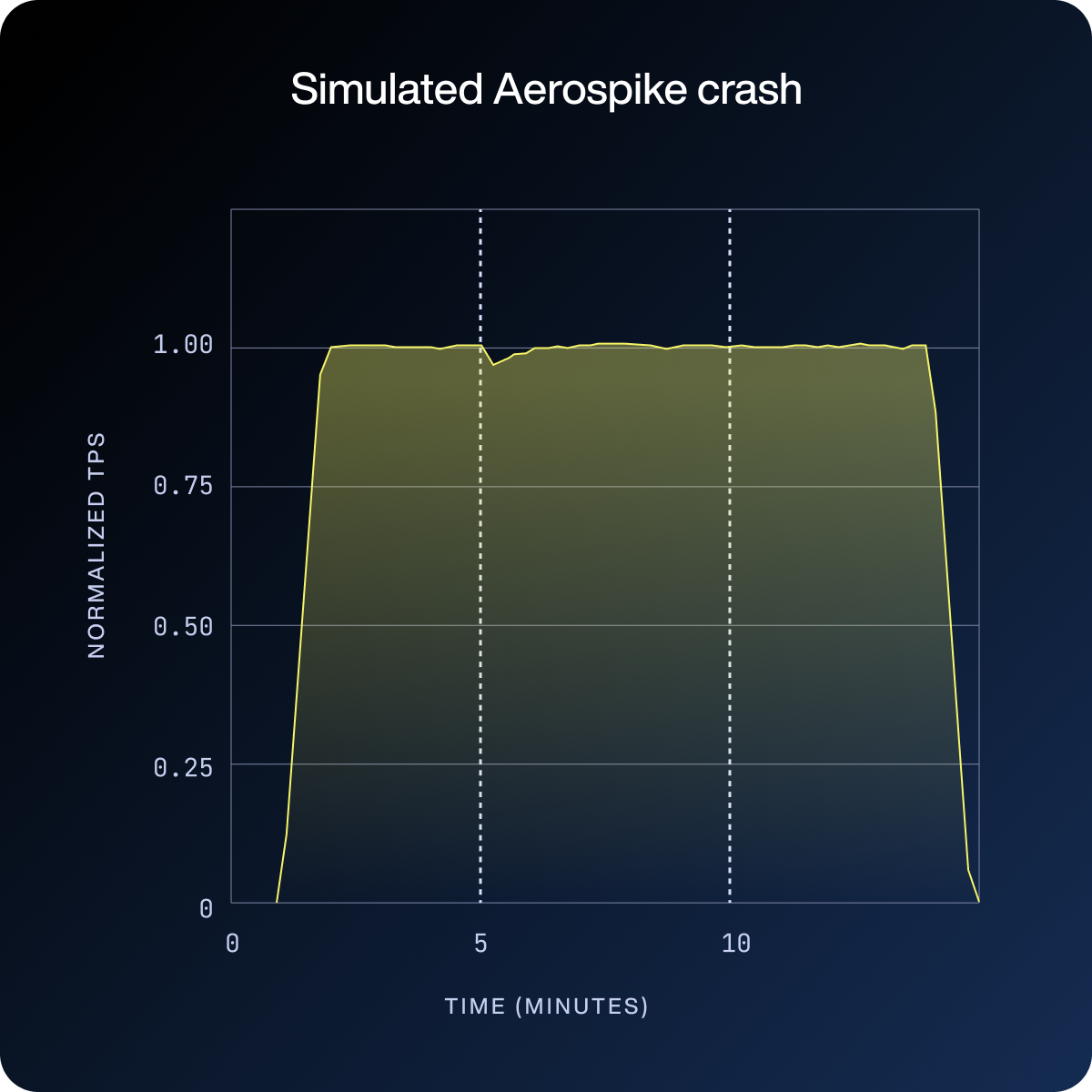
We tested the default EBS timeout, a three-second timeout, a one-second timeout, and one deliberate ungraceful node crash as a reference point for ideal fail-stop behavior.
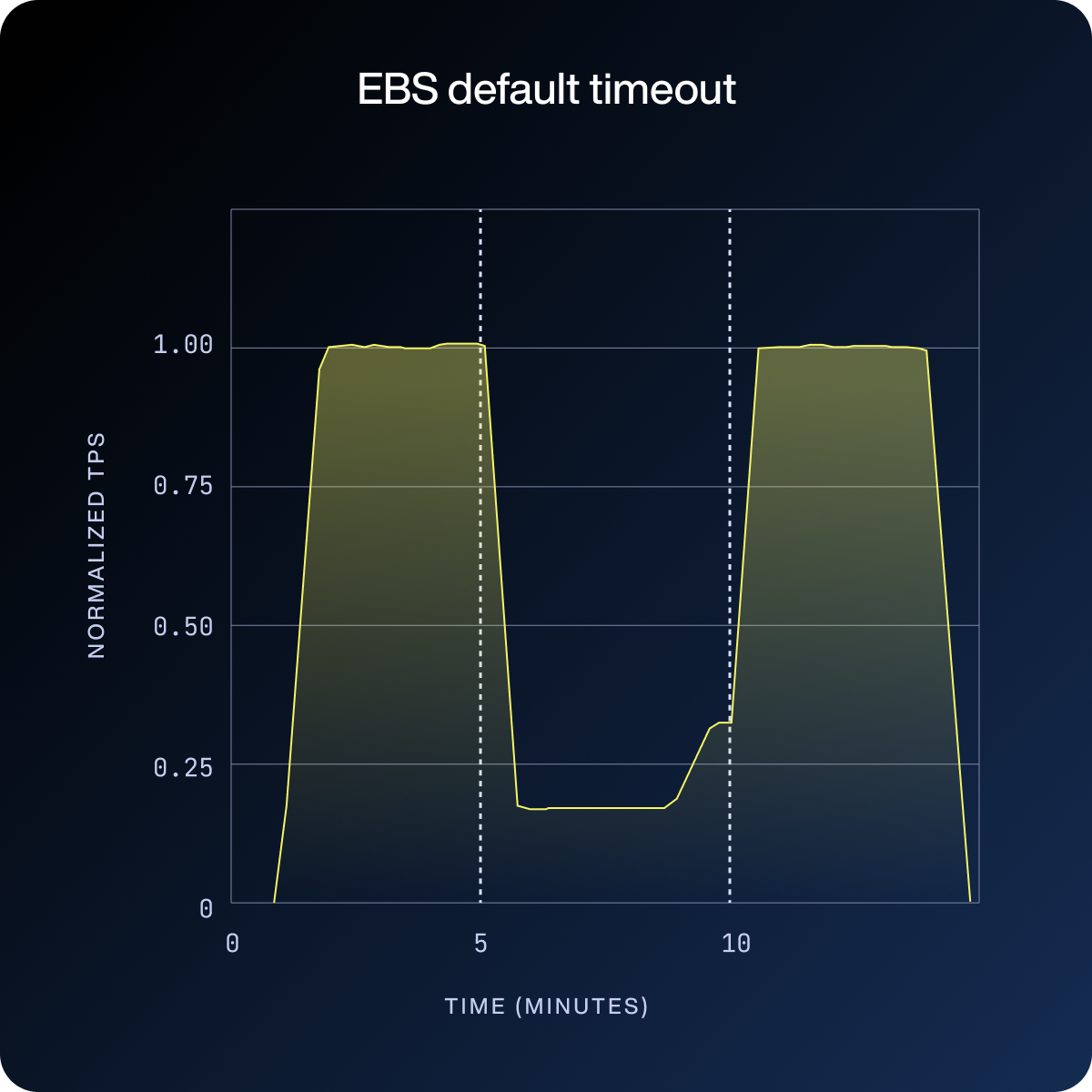
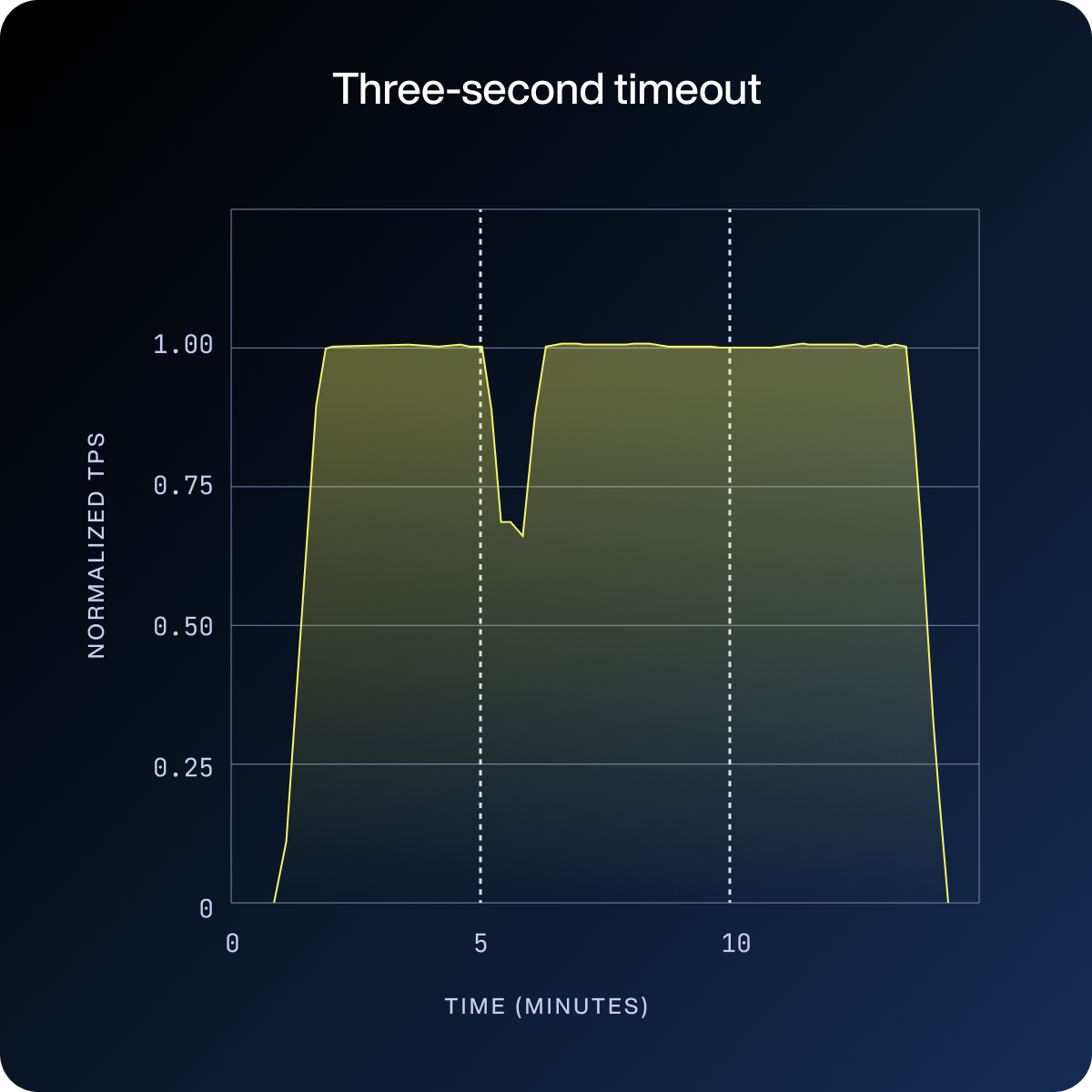
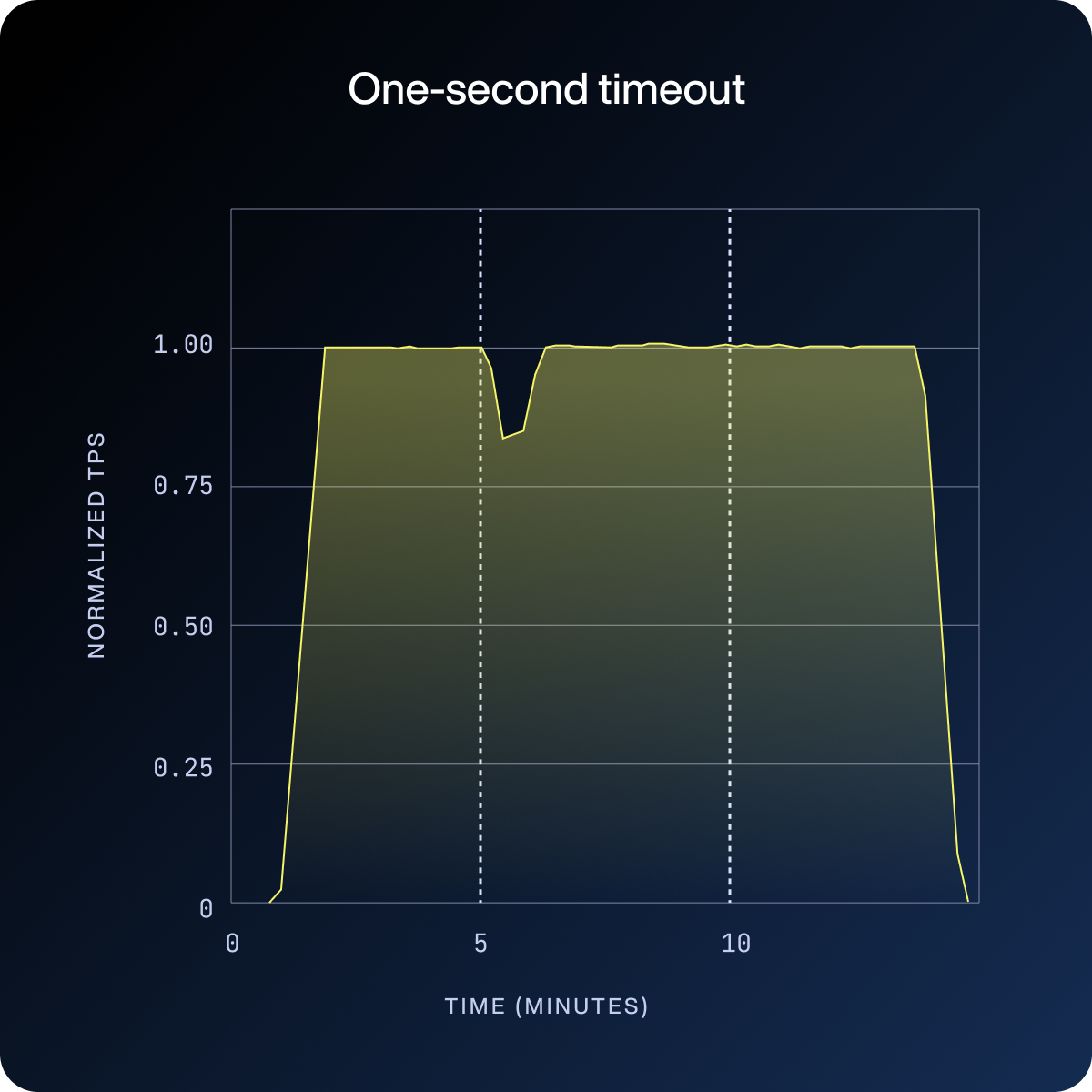
In the first three charts below, the vertical dotted lines mark the start and end of the fault injection window. What happens during that window (and after, in the default case) is the story.
Under the default setting, write throughput collapses and stays down for the full five minutes. The cluster never recovers until after the fault ends.
With a three-second timeout, the dip is sharp but brief: the cluster detects the failure, removes the affected node, and returns to normal throughput well within the first minute of the fault window.
The one-second timeout shrinks that recovery window further still. While shorter timeouts accelerate recovery, they also carry the critical risk of prematurely removing a node during a transient EBS pause, a key tradeoff that must be carefully considered.
The crash result in the fourth chart reveals what Aerospike is actually built for: lose one of three nodes and maintain predictable performance with near-immediate recovery, because there is no detection delay at all.
Where to change the setting and how the timeout chain works
Before getting to the fix, it helps to understand what actually controls this behavior. On Amazon Linux 20232, EBS NVMe device timeouts are set through a udev rules file at:
/usr/lib/udev/rules.d/70-ec2-nvme-devices.rules
The relevant line for EBS volumes is:
# Do not timeout I/O operations on EBS volumes.KERNEL=="nvme[0-9]*n[0-9]*", ENV{DEVTYPE}=="disk", ATTRS{model}=="Amazon Elastic Block Store", ATTR{queue/io_timeout}="4294967295"
The timeout value is in milliseconds. The default is the maximum value of a 32-bit unsigned integer, approximately 49.7 days. In practice, the kernel will never time out an I/O operation on an EBS volume.
For this experiment, we simply changed ATTR{queue/io_timeout}= to “3000” for the three-second delay and “1000” for the one-second delay, then rebooted the server.
Beyond the udev rule, the kernel NVMe module has its own timeout value in seconds as well as a retry parameter.
io_timeout: 30max_retries: 5
When a timeout does fire, the kernel retries the failed command up to five times before escalating the error to Aerospike. Once Aerospike receives the error, it aborts the affected node within seconds. With the default udev setting, none of this chain is ever reached; the device is told to wait indefinitely, so the retries and abort logic are never invoked.
White paper: Achieving resiliency with Aerospike’s real-time data platform
Zero downtime. Real-time speed. Resiliency at scale. Get the architecture that makes it happen.
What to know before changing the timeout in production
The default EBS timeout is designed for workloads where brief I/O pauses are preferable to surfaced errors. Aerospike, as a distributed database that can route around node failures, has different needs. The ability to detect and isolate a bad node is more valuable than the ability to wait out a transient pause.
A few things worth keeping in mind before deploying this change:
The default configuration is not the cautious choice. An indefinite I/O timeout does not prevent failure; it prevents detection of failure. The result is a gray failure that presents as a performance problem rather than a recoverable hardware event. Waiting it out is not a strategy; it just means waiting longer.
Your chosen timeout value needs to be baked into your AMI or launch template. A node that comes up with the default udev configuration reintroduces the problem the next time it is replaced. If your nodes are provisioned through autoscaling, that replacement can happen without warning.
Test your timeout value before shipping it. The FIS makes this straightforward. A short pause on a non-production cluster with your candidate timeout value gives you the detection latency and performance impact data you need to make an informed decision.
Finally, EBS is a zonal service. A timeout configuration change protects you from a single-node storage failure, but it does not protect you from an AZ impairment that affects multiple nodes simultaneously. Aerospike deployments relying on EBS should span multiple AZs, so that a zonal EBS event does not degrade the entire cluster regardless of how the timeouts are set.
Gray failures are hard to find after the fact, but the indefinite EBS default timeout represents a known, easily mitigated risk for Aerospike deployments on AWS. Adjusting your timeout is about more than just a configuration tweak; it is about aligning your infrastructure with the realities of distributed systems.
Applications that serve profile stores, billing services, and gaming management systems often rely on EBS as a cost-efficient, durable backing for hot-cached data. Users expect near-instant responses to actions like updating preferences, checking balances, and viewing real-time game leaderboards, so delays due to gray failures directly impact their experiences and can even lead to revenue loss. By embracing this ‘fail-fast’ approach, you allow Aerospike to do exactly what it was built for: identify the bottleneck, route around it, and maintain the predictable performance that powers your most mission-critical applications.
Try Aerospike Cloud
Break through barriers with the lightning-fast, scalable, yet affordable Aerospike distributed NoSQL database. With this fully managed DBaaS, you can go from start to scale in minutes.