Blog
Accelerating full-stack application development with Aerospike 8.2 and agent skills
See how we built TravelToads, a hotel booking app, with Aerospike 8.2, the new Java SDK, AEL, path expressions, and an AI coding agent. Run it in two minutes.
Blog
See how we built TravelToads, a hotel booking app, with Aerospike 8.2, the new Java SDK, AEL, path expressions, and an AI coding agent. Run it in two minutes.

How quickly can you go from a blank project to a working application using Aerospike? To find out, we built TravelToads, a complete hotel booking application with search, filters, property details, and live booking. The application was built end-to-end using Aerospike 8.2, which became generally available in September 2026, the new Java SDK, and an AI coding agent that handled much of the implementation, debugging, and verification.
Everything needed to run TravelToads is included in the project. You can launch an Aerospike cluster, the Java server code, and the React frontend in under two minutes. The startup process loads 900 hotel records and creates four secondary indexes to support the application's search features. The result is a working demonstration of Aerospike 8.2's capabilities and how its development tools work together. It also illustrates how Aerospike's official agent skills can guide AI-assisted development from the outset.
TravelToads is a demonstration booking application built around a fictional boutique travel company, featuring hotels, boutique properties, and short-term rentals across several U.S. metropolitan areas. Guests can search by destination or landmark, filter properties by rating, price, and amenities, explore room availability and rates for specific dates, and complete a booking.
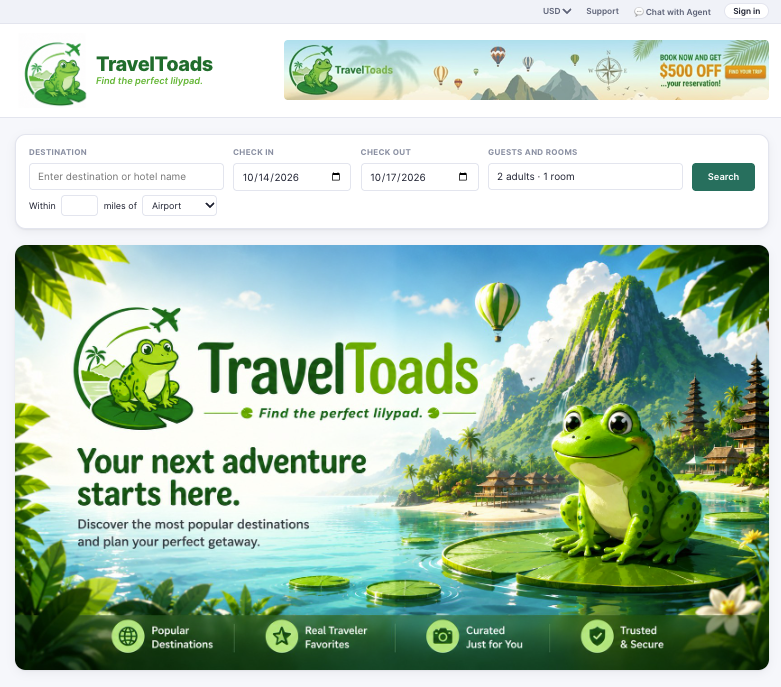
Behind the interface is an Aerospike Database that stores the application's data and powers its search and booking operations. Building an application like this requires more than creating a user interface. Developers also need to build the backend services and understand how to configure the database, model data, create indexes, and design queries that support the application's functionality.
One of the goals of TravelToads was to explore not only what Aerospike can do, but also how quickly developers can get a sample application running with the support of AI coding agents. Before writing the backend, our AI assistant loaded Aerospike's official agent skills, a set of curated, versioned guidelines that help agents configure database clients, create secondary indexes, work with complex data types, and design efficient data models.
The application creates a single Aerospike client and shares it across the application, rather than creating a new connection for each request. Its four secondary indexes correspond to actual search requirements in the application rather than being added simply because a field exists. Nested hotel data is handled using the SDK's typed APIs for Aerospike's complex data types, rather than manually traversing it in application code. The agent also verified its work against a running Aerospike 8.2 server. Aerospike Expressions Language (AEL) queries and path expression projections were tested against the live database before they were considered complete.
To get started, make sure Docker or Docker Desktop is installed and running on your local machine. Then open a terminal or shell and run the following commands to clone the repository and launch the demo:
git clone https://github.com/aerospike-examples/travel-toads
./demo start
Once the demo is running, open your browser and navigate to:
When you're finished, run the following command to stop the demo:
./demo stopAEL and path expressions simplify how developers query and work with complex data. AEL provides a readable way to define query conditions without constructing elaborate filters through SDK calls, while path expressions allow applications to access and operate on specific elements within nested data structures. Together, these capabilities reduce the amount of application-side code needed to retrieve and process data, helping developers build and iterate faster.
With AEL, developers can define query criteria using a concise, SQL-like syntax that makes complex filtering conditions easier to write, understand, and maintain.
For example:
$.rating >= 80 and $.locality == 'austin-downtown'Developers familiar with SQL will recognize the basic idea. The expression describes which records should match, while Aerospike determines how to execute the query.
TravelToads exposes these expressions in its presenter panel. The application displays the query being executed along with the secondary index selected by the server's query planner. When a user adds a filter, the query shown in the panel updates accordingly.
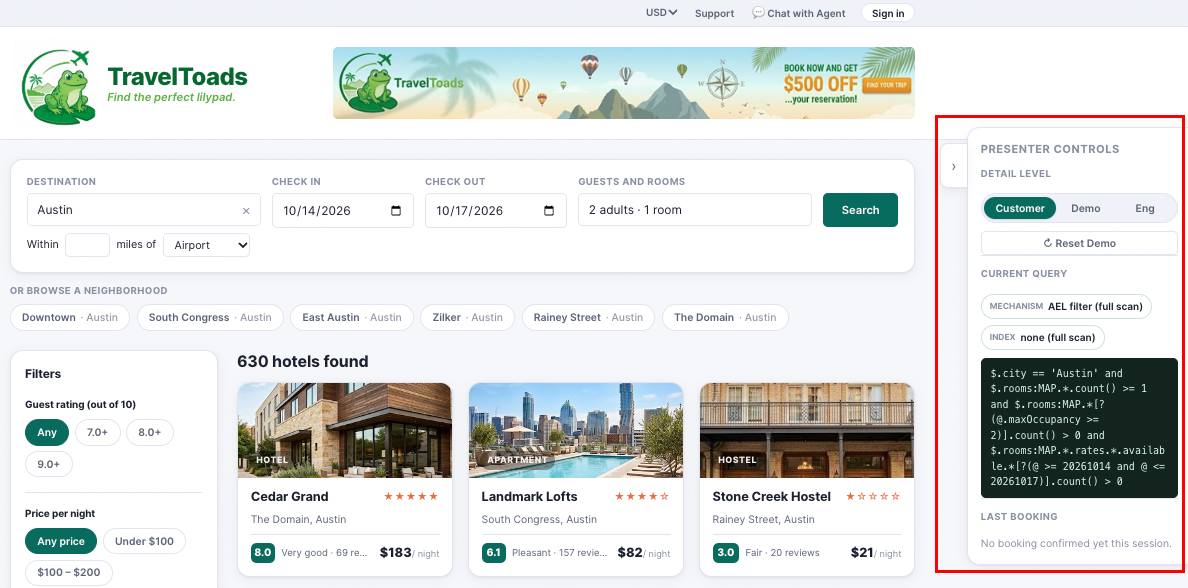
This makes the demo useful for understanding not only what the application is doing, but how Aerospike is handling the request underneath it.
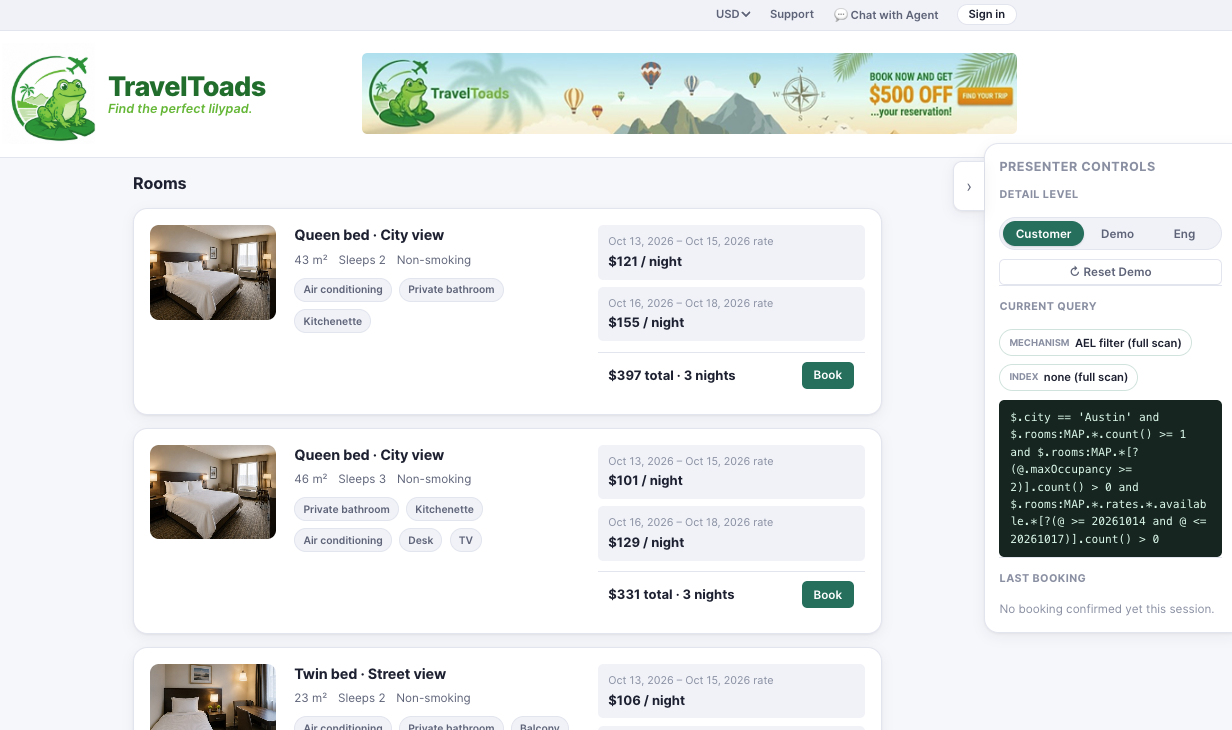
Path expressions address a different problem. Travel data is naturally hierarchical. A hotel can contain rooms, rooms can have different rates, and those rates can have different availability periods. A traditional approach might require retrieving a large record and then filtering that nested data inside the application. Path expressions allow that work to happen on the server.
TravelToads uses this capability on the property detail page. When a guest searches for specific dates, the application can retrieve only the relevant rooms and rate periods, rather than transferring the hotel's entire nested data structure to the backend. This reduces the amount of data moving between the database and application while keeping the filtering logic close to the data.
TravelToads uses Aerospike’s new Java SDK, which is now generally available. The demo builds the SDK from source as part of its Docker build.
The main difference with the new SDKs is the developer experience. Common operations, such as connecting to the database, creating a session, and running a query, require less boilerplate than the classic client API. For example, a query can follow a straightforward pattern such as:
session.query(hotels).where(ael, params).execute()The application uses a single shared client and session rather than establishing separate connections for individual requests. This keeps database access centralized and avoids unnecessary connection setup. The SDK also provides typed APIs for working with Aerospike's complex data types, including nested lists and maps. That is particularly useful in TravelToads, where hotel records contain multiple levels of nested information.
Aerospike also offers a Python SDK, bringing the same streamlined approach to Python development. TravelToads uses the Java SDK, but the availability of both new SDKs extends the updated developer experience across Java and Python.
The development process began with a detailed design document, followed by configuring the AI coding agent with Aerospike's latest SDK documentation and agent skills. From there, the application was developed, packaged, and tested against a running Aerospike 8.2 database.
The following six steps outline the process and highlight the decisions that helped keep the implementation aligned with the project's technical goals.
Before development began, we created a design document that established the application's functionality, technical requirements, and expected behavior. This provided Claude Code with a clear specification to follow rather than leaving architectural decisions to the agent's assumptions.
You can find the actual design document we used for TravelToads in the aerospike-examples repo.
The document covered several key areas:
Application requirements: A realistic hotel booking interface with destination search, property filters, room availability, and a complete booking flow.
Screen-to-query mapping: A defined relationship between each interface feature, its backend endpoint, and the Aerospike query it would execute.
Demo dataset: Approximately 900 fictional properties across Austin, Round Rock, and San Marcos, using real geographic coordinates and neighborhoods, with a rolling 90-day availability window.
Data model: One Aerospike record per hotel, containing a nested map of rooms, rates, available dates, and reservations.
Index strategy: Four secondary indexes supporting geographic, locality, rating, and minimum-price searches.
Demo sequence: A defined series of interactions demonstrating the SDK, AEL, path expressions, and booking operations.
The screen-to-query mapping was particularly important because it connected the user experience directly to the database functionality being demonstrated. The data model and index strategy were designed together. For example, available dates were deliberately excluded from secondary indexing. Indexing individual available days can produce multiple matches for the same hotel during a multi-night search, increasing the workload required to process the results.
Establishing these decisions before implementation gave Claude Code a consistent architectural foundation and provided a reference for evaluating its output.
Here's the full opening prompt. It covers every step, so the front end and packaging are specified up front rather than requested piecemeal.
I want to build a demo that showcases Aerospike's AEL and Path Expressions,
using the next-generation Java SDK against Aerospike 8.2. Our design doc is
below. Start by turning it into docs/design.md, before any code.
SOURCES
Ground every decision in Aerospike's official Agent Skills
(https://github.com/aerospike/agent-skills) and in the Java SDK's own
repository. Read versions and APIs from those sources, not from memory. Check
the data model and the booking write path against the skills, especially hot
keys, client error-rate backoff and bounded collections.
FRONT END
It must look and feel like a real hotel booking site, not a debug console.
Use React, Vite, and TypeScript with plain CSS. Include destination, date, and
guests search with a hotel-name typeahead; a filter sidebar (price, rating,
amenities, property type, bed, view); neighborhood chips; a distance-from-
landmark slider; result cards with photos; a property page showing rooms and
rates for the chosen dates; and a booking modal with a confirmation page.
Add a presenter panel that shows the live AEL behind the current view, with
Off, Demo, and Engineering modes and a Reset Demo button. Build it against the
API contract in the design doc, and test it with a mock back end and
Playwright until the real back end is ready.
PACKAGING
The whole demo must run in Docker Compose, so anyone can clone the repo and
get a working system with one command. Services: Aerospike (the public 8.2
server image), a one-shot data generator that writes the dataset to a shared
volume, the back end, and the front end. Order startup with health checks and
depends_on. Use multi-arch base images. In aerospike.conf, set a
cluster-name, mount the file as the image's template config, and add an
alternate-access-address of 127.0.0.1 for host tools like Voyager.
Wrap it in a single ./demo script with start, stop, reset, seed, status, and
logs, and have start check for Docker Compose v2 first. Generate the dataset
deterministically from a seed, with dates relative to today. Pin the SDK and
server versions.
DONE MEANS
./demo start works from a clean machine; every query in the presenter panel
is the query that actually runs, with no silent fallbacks; and two
simultaneous bookings of the same room produce one success and one 409.
After running this prompt, we then pasted the design doc underneath it.
With the application requirements defined, the next step was to ensure the coding agent used the correct Aerospike APIs and versions. This was especially important because TravelToads uses relatively new capabilities, including Aerospike 8.2, the next-generation Java SDK, AEL, and path expressions. An AI coding agent relying solely on its training data might generate code based on older APIs or unsupported functionality.
The development instructions therefore specified:
Aerospike Server 8.2: The target database version, using the public aerospike-server:8.2.0.0 container image.
Next-generation Java SDK: The client library used for database connectivity and application operations.
AEL and path expressions: The query capabilities used for filtering records and accessing nested data.
Official SDK repository: The authoritative source for API signatures, supported operations, and version requirements.
Aerospike agent skills: Recommended practices for client configuration, data modeling, indexing, and write operations.
The agent was instructed to consult these sources rather than infer API behavior from memory. SDK and server versions were also pinned to keep the development and testing environments consistent. This approach helped reduce compatibility issues and ensured that implementation decisions reflected the capabilities of the target Aerospike release.
Aerospike's agent skills provided additional guidance as Claude Code implemented the application's backend. Rather than treating these guidelines as a final review checklist, the development process incorporated them from the beginning.
Several practices were particularly relevant to TravelToads:
Because each hotel is represented by a single record, simultaneous booking requests for the same property can contend for access to that record. The implementation uses retries with jittered exponential backoff to handle transient contention, starting at 20 milliseconds and allowing up to four attempts.
Under sustained contention, the SDK's error-rate circuit breaker can activate. The application handles this condition by returning an appropriate HTTP 503 response rather than exposing an internal server error or continuing to retry.
Hotel records contain lists of available dates and completed reservations. The demo operates within a finite booking window and resets its dataset between runs, providing a practical bound on collection growth within the demonstration environment.
The agent checked SDK methods and server capabilities against the actual source code and running environment, rather than assuming that generated code was valid. These practices were subsequently evaluated through testing, including a test involving 505 concurrent booking requests against a single hotel.
By combining established development guidelines with runtime verification, the team could use AI-generated code without relying exclusively on the agent's implementation choices.
The frontend and backend were developed in parallel using the API contract established in the design document. TravelToads uses React, Vite, TypeScript, and CSS for its frontend. Claude Code generated the interface based on descriptions of the required screens and interactions, with subsequent refinements guided by visual inspection and functional testing. The interface includes destination and date searches, property filters, neighborhood selection, distance-based searches, hotel listings, room details, and booking confirmation.
Each interactive control corresponds to a specific backend query behavior. For example, selecting a price filter changes the query predicates, while searching near a landmark invokes a geographic query. To validate the frontend before the backend was complete, the agent created a temporary Node.js mock API using 48 fixture hotels structured according to the application's data model.
Playwright tests exercised the interface against this mock service, including search, filtering, booking, and error-handling scenarios. The agent also inspected screenshots to identify interface issues before integration with the real backend. Once the Aerospike-backed services were available, the mock was replaced with the actual API.
An important feature of TravelToads is its collapsible presenter panel, which displays the AEL expression associated with the current application view. As users change filters, the panel updates to show how those interactions affect the query. For example, applying a price limit to an Austin search changes the displayed predicate and narrows the results.
The interface supports three presentation modes: Off, Demo, and Engineering. Demo mode provides brief explanations of the operations being performed, while Engineering mode exposes additional query details. This makes TravelToads more than a functional booking application by providing a way to examine the relationship between frontend interactions, backend requests, and Aerospike query execution.
A key requirement was to make TravelToads easy for developers, sales engineers, and other users to run without requiring manual configuration of a database or application environment. To accomplish this, the project uses Docker Compose and a single ./demo command-line script.
The deployment consists of four services:
Aerospike: A single-node Aerospike 8.2 instance with an in-memory namespace.
Data generator: A one-time service that creates a reproducible dataset of fictional hotel properties.
Java backend: The application service responsible for creating indexes, loading data, and handling search and booking requests.
React frontend: The compiled web application, served through nginx with API requests proxied to the backend.
Running ./demo start builds and launches the complete environment. Additional commands support resetting the dataset, checking service status, viewing logs, and stopping the application.
The deployment configuration also addresses several environment-specific requirements, including compatibility with Docker Compose v2, Aerospike 8.2 cluster configuration, and support for both Apple Silicon and Intel systems. Aerospike's alternate access address is configured so users can also inspect the database via Aerospike Voyager on their local machines.
Together, these decisions make the application reproducible and reduce the setup work required to explore its features.
The final step was to confirm that TravelToads used the intended Aerospike capabilities and that its operations behaved correctly under realistic conditions. This verification was critical for our Claude-code-driven development. Coding agents may introduce fallback implementations to keep an application functioning, even when those alternatives bypass the specific technology the application is intended to demonstrate.
We therefore tested the application against a running Aerospike 8.2 instance, focusing on several areas:
Verification area | What was tested |
End-to-end startup | Services build, indexes become ready, data loads, and booking operations succeed |
Query execution | Displayed queries correspond to actual database operations |
AEL filtering | Supported filters execute as intended without being silently omitted |
Path expressions | Nested room and rate projections execute on the server rather than through application-side filtering |
Booking consistency | Concurrent requests cannot successfully reserve the same room twice |
Error handling | Contention and unsupported operations produce appropriate responses |
Booking consistency required particular attention. The application removes booked dates from the available inventory and records the reservation in a single atomic operation. However, removing a value that is no longer present in an Aerospike list can succeed without modifying the list. To prevent a second booking from being incorrectly accepted, the backend checks the number of removed elements as part of the atomic operation. Tests confirmed that a conflicting booking returns HTTP 409 and that inventory remains consistent.
All in all, the development process illustrates the value of combining AI-assisted implementation with explicit architectural requirements, authoritative technical guidance, and direct verification. Claude Code allowed us to accelerate development, while the design document, agent skills, and testing provided the structure needed to produce a reliable demonstration.
TravelToads is available as a public example that you can run locally.
Clone aerospike-examples/travel-toads, run ./demo start, and the project starts an Aerospike 8.2 cluster, Java backend, and booking application in under two minutes. No cloud account or manual database configuration is required.
For engineering teams evaluating Aerospike, this provides a more practical way to explore the platform than a presentation alone. You can run the application, inspect the data, change a query, see the resulting AEL expression, and examine how the backend uses indexes and path expressions.
For a deeper understanding and more insights, explore these additional resources.
See more
Blog
Blog

Blog

Blog
