Store and load products
For the complete documentation index see: llms.txt
All documentation pages available in markdown.
In this step you implement the two simplest data-access methods on KeyValueServiceNewClient. The storeProduct method writes a Product business object to a set, and getProduct reads one back by its key. Before you implement them, you walk through the constructor that wires up the SDK’s ClusterDefinition, Behavior, and Session.
Open the file
-
Stop the Spring Boot application from the previous step with
Ctrl+C. Leave Voyager open and connected. -
Open
spring-server/src/main/java/com/aerospikeworkshop/service/KeyValueServiceNewClient.javain your IDE.Every code change in this section, and in the next section, is made in this single file.
Walk through the SDK connection code
The SDK connection code is already written for you, in the constructor of KeyValueServiceNewClient. Find it under the // TODO: STEP 1: VALIDATE THE CONNECTION header near the top of the file:
public KeyValueServiceNewClient(ClientConfiguration config) {    // =================================================================================    // TODO: STEP 1: VALIDATE THE CONNECTION    // =================================================================================    ClusterDefinition clusterDef = new ClusterDefinition(config.getHostname(), config.getPort());    if (config.getUserName() != null && config.getPassword() != null) {        clusterDef = clusterDef.withNativeCredentials(config.getUserName(), config.getPassword());    }    aerospikeCluster = clusterDef.connect();
    session = aerospikeCluster.createSession(Behavior.DEFAULT);}
You do not change this code in this tutorial, but reading the constructor top to bottom helps you understand the SDK pieces you use later:
ClusterDefinitiondescribes how to find and authenticate against your cluster. It accepts the seed hostname and port, plus optional credentials, TLS settings, and other connection options. The hostname and port come fromapplication.yamlthrough standard Spring property binding, so for a default Docker install the values are already correct.connect()opens the cluster connection and returns aClusterobject that owns the underlying network resources.- A
Clustercannot run data operations on its own. The SDK requires aBehavior, which centralizes timeouts, retry policy, replica selection, and other per-call settings in one place. If you have used the legacy Aerospike client,Behaviorreplaces the per-methodPolicyobjects. Behaviors are hierarchical and can be loaded from a YAML file by name. Cluster.createSession(Behavior.DEFAULT)returns aSessionthat you use for inserts, queries, and updates. This tutorial usesBehavior.DEFAULTto keep the focus on the data API.
You use the session field for every database call from this point on.
Implement storeProduct
The auto-loader calls storeProduct(product) once per record in the data/styles folder. The method body is a placeholder comment that describes what to implement.
-
Find the
storeProductmethod.public void storeProduct(Product product) {// =================================================================================// TODO: STEP 2: STORE A PRODUCT OBJECT// =================================================================================// Implement the logic to store a `Product` object in the database.//// This task tests the client's object mapping capabilities. Your goal is to:// - Use the `session` object to `insertInto` the `productDataSet`.// - Pass the `product` object to the operation.// - Specify the `productMapper` to handle the conversion.// - Execute the operation.// - Throw an exception if it's already there.// =================================================================================} -
Replace the comment with the SDK call.
session.insert(productDataSet).object(product).using(productMapper).execute();This is the SDK’s fluent style: each method call adds one piece of the operation to a builder, and the chain reads top to bottom:
insertwrites the record and fails if a record with the same key already exists. The other write verbs areupdate(fails if the record does not exist) andupsert(writes the record whether or not it exists). The corresponding read verb,query, is what you use ingetProductlater in this step.productDataSetis the destination. ADataSetis a(namespace, set)pair. Because this method uses object mapping,productDataSetis declared as aTypeSafeDataSet<Product>, which lets the SDK enforce that you only writeProductobjects to it.object(product)is the value to write. Theproductparameter is a plain Java object.using(productMapper)selects theRecordMapper<Product>that converts the object to and from Aerospike bins. The sample application providesproductMapperas a field. You can also use the standalone Java Object Mapper instead of writing your ownRecordMapper.execute()is the terminal call that ships the operation to the cluster. Every fluent chain in the SDK ends with a terminal call (most oftenexecute()). If you forget it, the chain only describes the operation and no request reaches the cluster.
Confirm storeProduct works
-
Stop the Spring Boot application if it is still running.
In the terminal where the application is running, press
Ctrl+Cand wait for the shell prompt to return.If the previous Spring Boot process is no longer running but port
8080is still bound, find the holding process withlsof -nP -iTCP:8080 -sTCP:LISTENand stop it. -
Change into the
spring-serverdirectory if you are not already there.Terminal window cd spring-serverEvery Maven command in this tutorial runs from
aerospike-client-sdk-workshop/spring-server, where the project’spom.xmllives. If you open a new terminal between steps, run thiscdfirst. -
Rebuild the project, then run it with the
new-clientprofile.Terminal window mvn clean package -DskipTestsmvn spring-boot:run -Dspring-boot.run.profiles=new-clientRun the two commands one at a time and wait for the first to print
BUILD SUCCESSbefore you start the second. The auto-load line in the logs still reportssuccess=200.Build error: no POM, or no Spring Boot plugin
If
mvnreportsthere is no POM in this directoryorNo plugin found for prefix 'spring-boot', you are running Maven from the workshop root instead of fromspring-server. Runcd spring-serverand try the commands again. -
In Voyager, select Refresh at the top of the cluster details panel.
The
testnamespace now reports 200 records.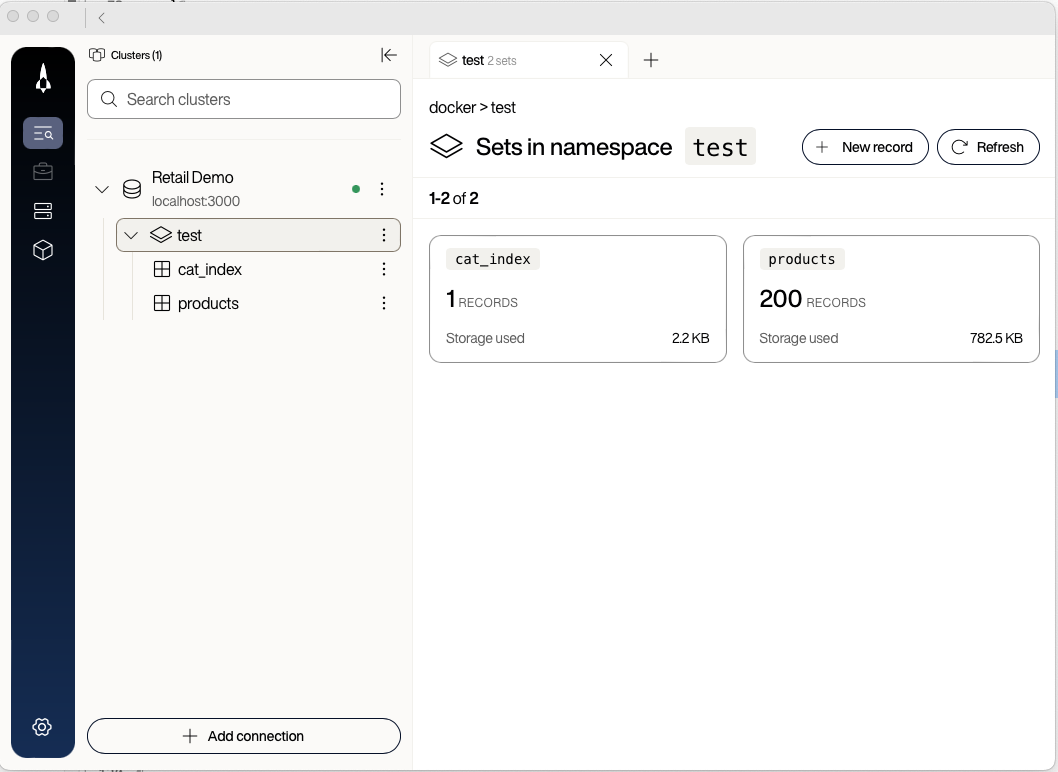
-
Drill into the
productsset to confirm that the records contain product data.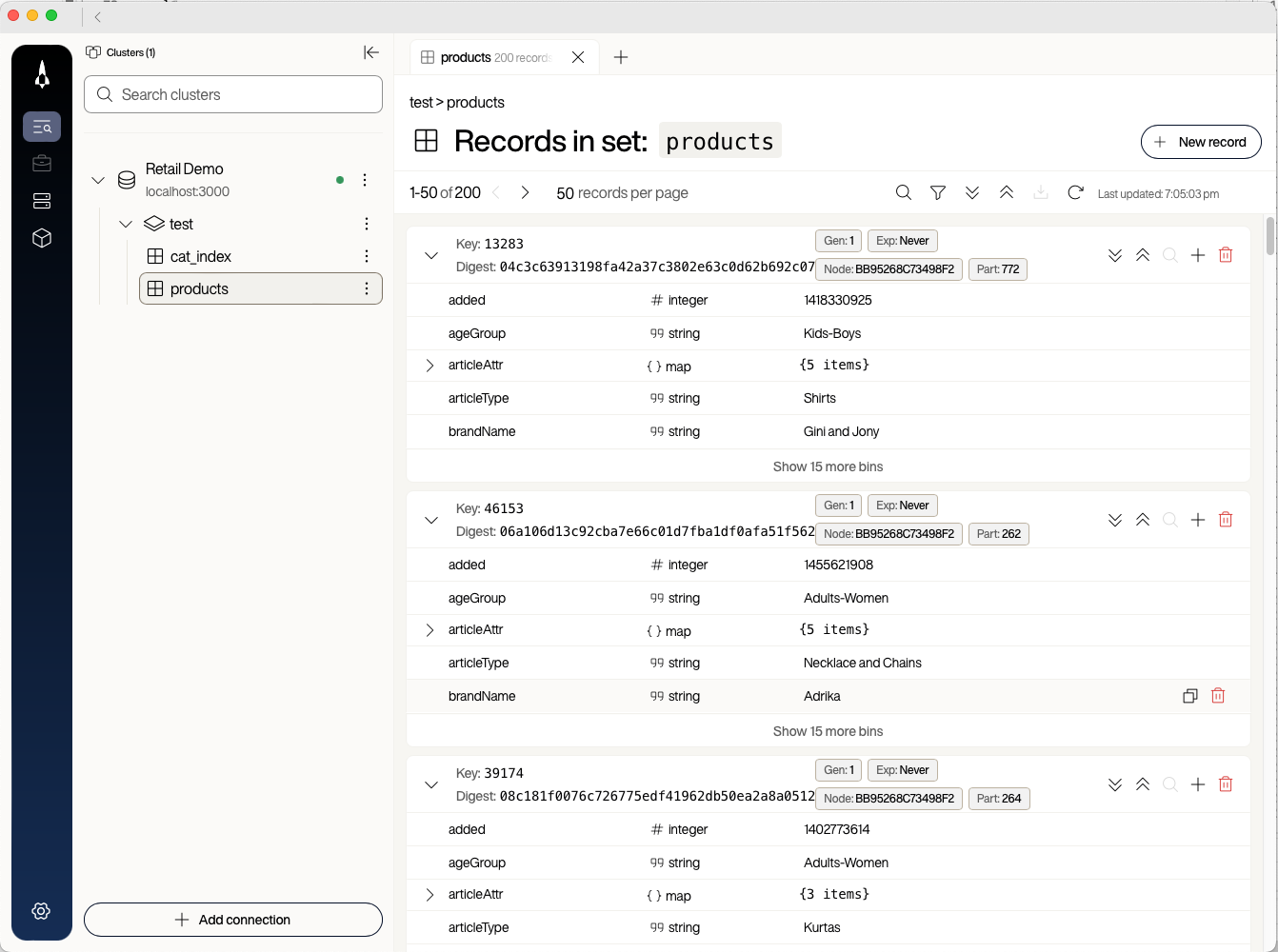
You may need to refresh the set view as well as the namespace view to see the rows.


The fluent verb / execute() pattern reads like a sentence, so AI coding assistants in your IDE can often suggest the rest of a chain after you type the first call. Type each chain yourself the first time to understand what every part does, then accept the assistant’s suggestions on later methods if you find them helpful.

Implement getProduct
The getProduct(productId) method returns an Optional<Product>: the matching product if one exists, or Optional.empty() if not.
-
Find the
getProductmethod. The body is a single line,return Optional.empty();. -
Delete the
return Optional.empty();line, then paste the following chain in its place. If bothreturnstatements remain, the compiler reports anunreachable statementerror.return session.query(productDataSet.id(productId)).execute().getFirst(productMapper);The chain has three parts:
session.query(productDataSet.id(productId))builds a query with one key. The SDK detects the query type for you. With one key this is a point read; with several keys it is a batch read; with a data set being passed, it is either an index scan or a full scan. You do not have to specify which.execute()ships the operation and returns a result stream.getFirst(productMapper)reads at most one record from the stream and maps it to aProduct. Because point reads return zero or one record, the result is naturally anOptional<Product>.
Confirm getProduct works
-
Stop the Spring Boot application if it is still running, then rebuild and rerun it from the
spring-serverdirectory.Terminal window cd spring-servermvn clean package -DskipTestsmvn spring-boot:run -Dspring-boot.run.profiles=new-clientIf you are already in
spring-server, you can skip thecd. Run the twomvncommands one at a time. -
In your browser, reload http://localhost:8080.
The home page is still empty because you implement the listing query in the next step, but you can confirm that point reads work by visiting a product detail page directly.
-
In Voyager, open the
productsset and copy any value from the userKey column at the start of a row. This is the record key you query against. -
In your browser, visit the product detail URL, replacing
PRODUCT_IDwith the key you copied:http://localhost:8080/product/PRODUCT_IDThe page renders with the product’s details. If you visit a URL with a key that does not exist (for example, append
xyzto a real key), the page renders an empty or “not found” state instead of throwing.
Outcomes
You now have:
- Two hundred product records in the
test.productsset. - The ability to look up any product by key from the running application.
- A working understanding of
ClusterDefinition,Behavior,Session, and the SDK’s fluent verb /execute()pattern.
You cannot yet:
- See products listed on the home page or in category dropdowns.
- Filter products by category, article type, usage, or brand.
In the next step you implement the secondary-index query that powers product listings, then build a multi-condition query for the advanced search filters.