Query by secondary index
For the complete documentation index see: llms.txt
All documentation pages available in markdown.
In this step you implement the two query methods that power the application UI. You first build a single-condition secondary-index query (query), then a multi-condition query (advanced_search). Along the way you use Voyager to construct an AEL filter visually and paste it into your code.
The previous step left the products set with 200 records, but the home page still shows empty product rows because the listing query is unimplemented.
The product grid is populated by the query method, which you implement now. Every code change in this step lives in python-server/src/aerospikeworkshop/services/key_value_service_new_client.py.
Use Voyager to build an AEL filter
The application defines five secondary indexes on the products set: articleType, subCategory, brandName, usage, and category. A secondary index lets the database find records by bin value without scanning every record. The home-page dropdowns issue queries through query(index, filter_value, count). Before writing code, build a sample query in Voyager so you can confirm the result and copy the generated AEL.
-
In Voyager, drill into the
productsset and expand any record by selecting Show 15 more bins.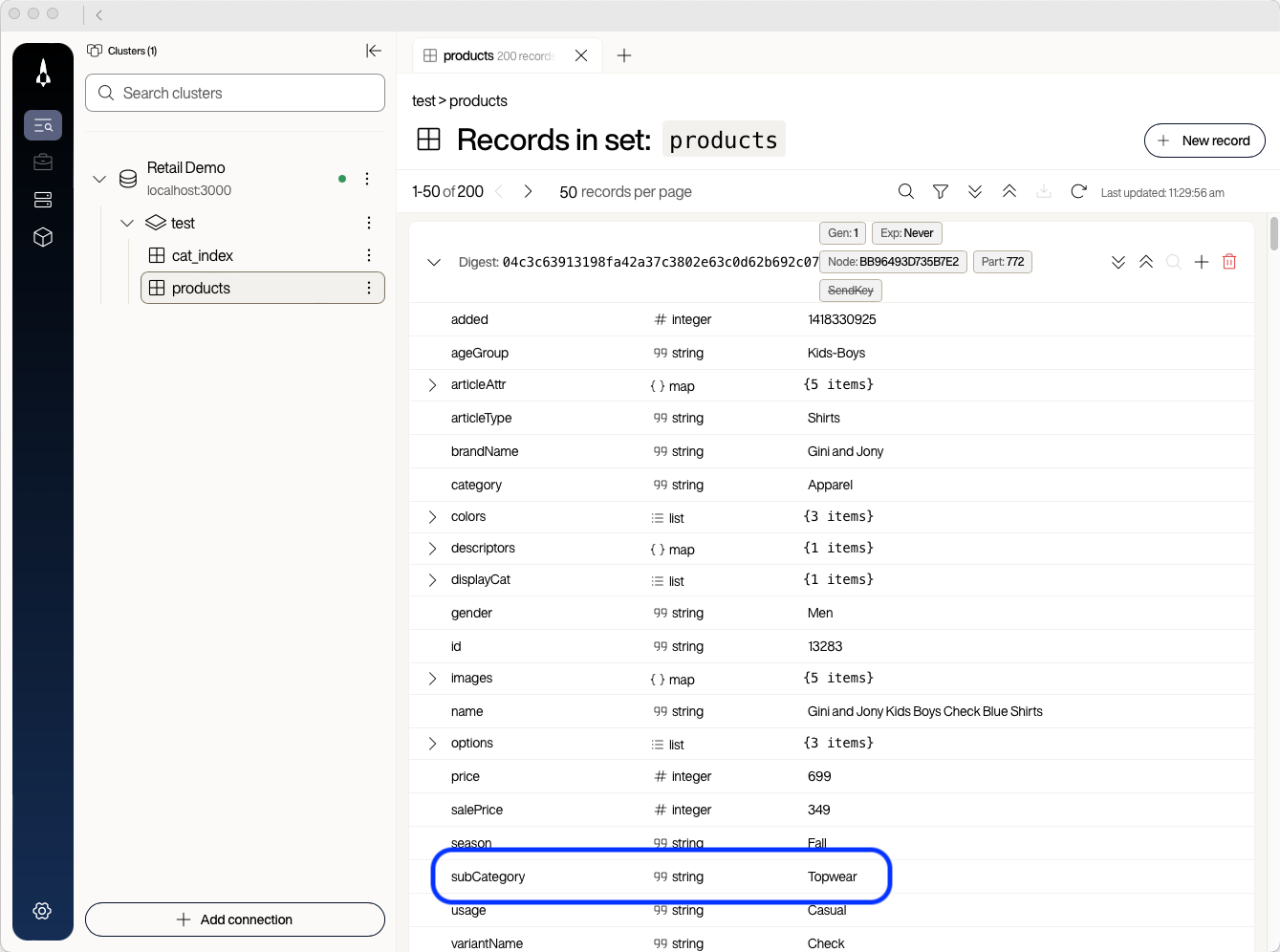
Note the
subCategorybin. You filter on it next. -
Select the filter (funnel) icon at the top of the set view.
-
In the filter dialog, enter
subCategoryas the field andShoesas the value, then select Apply.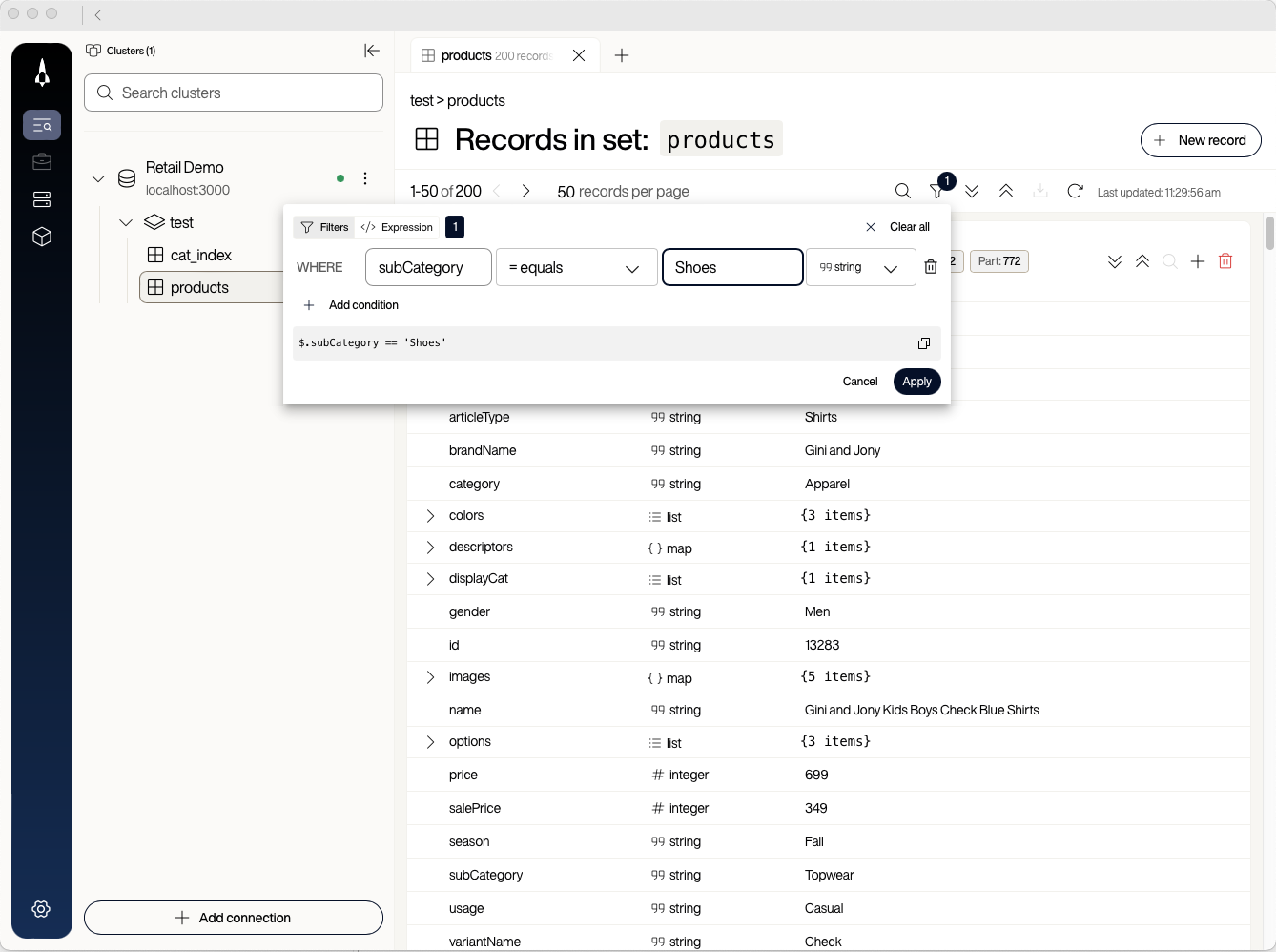
The set view updates to show only products whose
subCategoryisShoes. Voyager pages the results 25 rows at a time and does not display a total, so select > to page through the matches. -
Open the filter again and look at the bottom of the dialog.
The dialog shows the corresponding AEL expression:
$.subCategory == 'Shoes'. In AEL,$refers to the current record, so$.subCategoryreads thesubCategorybin.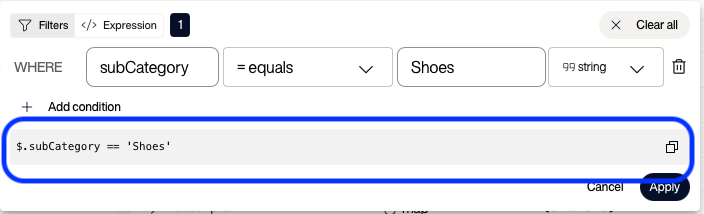
AEL is the Aerospike Expression Language. It looks similar to JSONPath and supports both bin values and record metadata such as time to live (TTL) or record size. You use the visually built expression as a starting point in code.
-
Select the copy button to the right of the expression.


You can use the same workflow in reverse to debug expressions you write by hand. Whenever you are not sure that an AEL expression is correct, paste it into Voyager’s filter dialog (use the Expression tab to enter AEL directly) and confirm that Voyager returns the rows you expect before you put the expression into Python code.
Implement the single-condition query
-
In
key_value_service_new_client.py, find thequerymethod.The current body returns a hard-coded product:
product = await self.get_product("13283")products = [product] if product else [] -
Replace the two lines above with a hard-coded filter first, to confirm the pattern works. Delete the original lines in full.
session = self._require_session()stream = await (session.query(self.product_dataset).where("$.subCategory == 'Shoes'").execute())products: list[Product] = []async for row in stream:if row.is_ok and row.record is not None:products.append(Product.from_bins(row.record.bins))stream.close()In the loop,
row.is_ok and row.record is not Noneapplies the same success checks as theget_productguard, withoutresult is Nonebecauseasync foronly yields rows from the stream.Leave the existing
return QueryResult(...)line as it is. -
Stop the FastAPI application with
Ctrl+C(if it is running), then restart it from thepython-serverdirectory.Terminal window cd python-serverAEROSPIKE_CLIENT_PROFILE=new-client AEROSPIKE_PORT=3000 \uvicorn aerospikeworkshop.main:app --host 0.0.0.0 --port 8080 -
Reload http://localhost:8080.
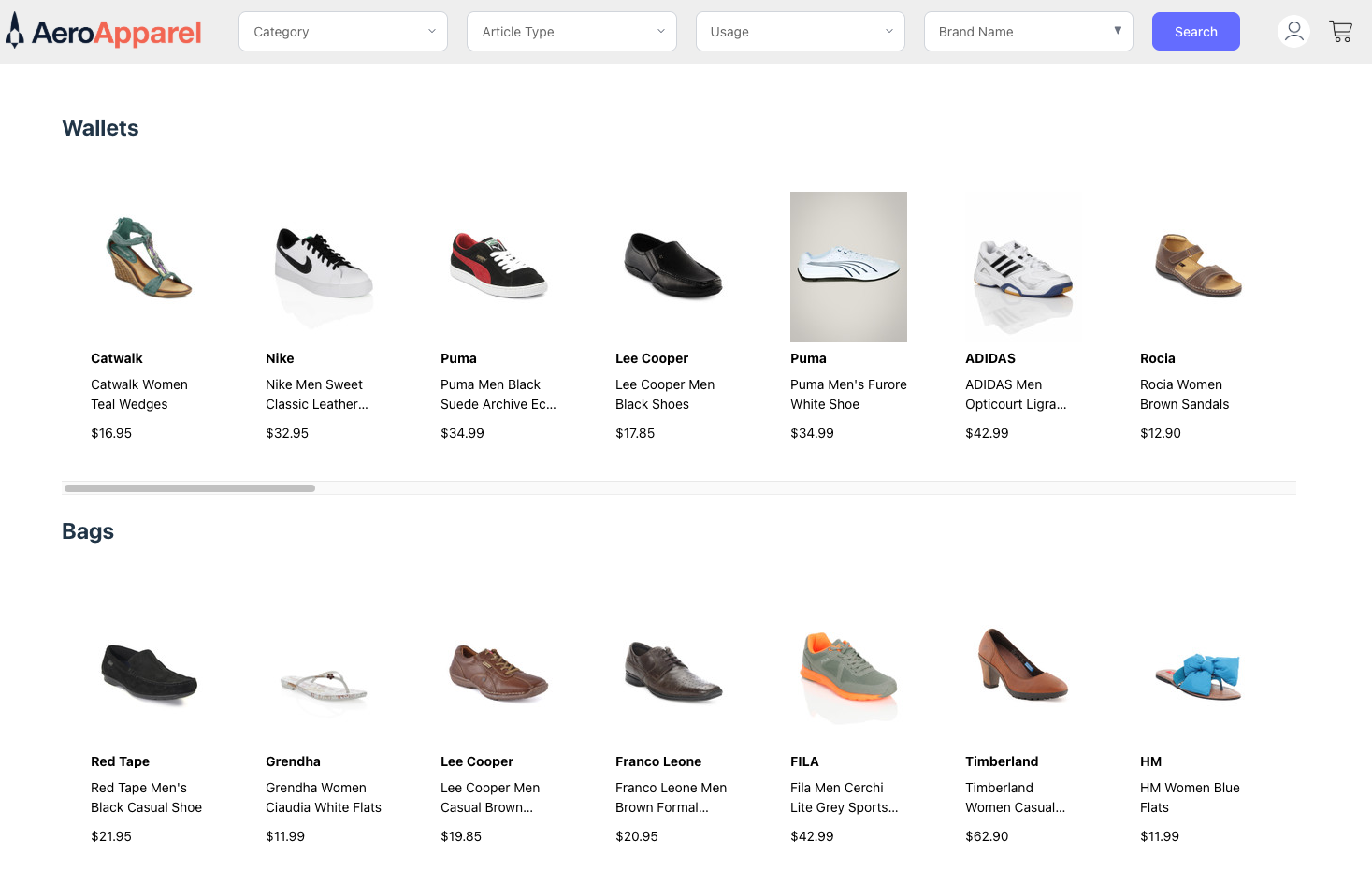
The home page now shows shoes everywhere because the filter is hard-coded.
-
Replace the query block again, this time using the
indexandfilter_valueparameters.session = self._require_session()stream = await (session.query(self.product_dataset).where(f"$.{index} == '{filter_value}'").bins(["id", "name", "images", "brandName", "price"]).limit(count).execute())products: list[Product] = []async for row in stream:if row.is_ok and row.record is not None:products.append(Product.from_bins(row.record.bins))stream.close()Three changes from the previous version:
wheretakes an f-string that substitutes the index name and filter value into the AEL expression.bins([...])returns only the bins the home page needs. Returning fewer bins reduces network and memory pressure when the full record is large.limit(count)caps the number of results when the caller asks for a maximum.
-
Stop the FastAPI application with
Ctrl+C, then restart it.Terminal window cd python-serverAEROSPIKE_CLIENT_PROFILE=new-client AEROSPIKE_PORT=3000 \uvicorn aerospikeworkshop.main:app --host 0.0.0.0 --port 8080 -
Reload http://localhost:8080.
Each category and article-type dropdown now populates with the correct items.

Implement multi-condition advanced search
The four dropdowns at the top of the home page (Category, Article Type, Usage, Brand Name) all feed into advanced_search(...). The method combines up to four bin == value predicates with and.
At the top of advanced_search, helper code builds an ael string from the filter parameters. Leave this block in place—you pass ael to .where(ael) in the SDK call below:
indexes = {    "category": as_non_null_string(category),    "articleType": as_non_null_string(article_type),    "usage": as_non_null_string(usage),    "brandName": as_non_null_string(brand_name),}
ael = ""for field, value in indexes.items():    if value:        if ael:            ael += " and "        ael += f"$.{field} == '{value}'"print(f"AEL: {ael}")
When a reader selects Category Apparel and Usage Sports, the log prints:
AEL: $.category == 'Apparel' and $.usage == 'Sports'The current body returns a single hard-coded product:
product = await self.get_product("13283")products = [product] if product else []Use Voyager once more to confirm that the multi-predicate AEL is correct, then write the SDK call.
-
In Voyager, open the filter dialog and add two filter rows:
categoryequalsFootwear, andusageequalsSports. Select Apply.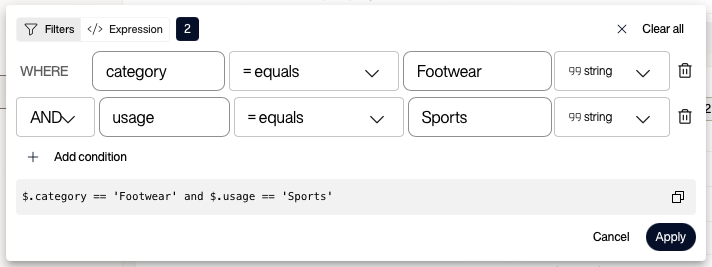
The set view shows only sports footwear, and the dialog displays the combined AEL:
$.category == 'Footwear' and $.usage == 'Sports'. -
Find
advanced_searchinkey_value_service_new_client.py. Replace the two hard-coded stub lines below the helper code (product = await self.get_product(...)throughproducts = [product] if product else []) with the following:session = self._require_session()stream = await (session.query(self.product_dataset).where(ael).limit(count).execute())products: list[Product] = []async for row in stream:if row.is_ok and row.record is not None:products.append(Product.from_bins(row.record.bins))stream.close()The body is almost identical to the single-condition query. The only differences are that
wheretakes theaelstring the helper code already built, andbins([...])is omitted because the search results page renders the full record.You did not tell the SDK which secondary index to use. The SDK sends your AEL expression to the server, which picks the predicate it expects to match the fewest records and uses that predicate’s index to fetch a small candidate set. The server checks the remaining predicates against those candidates. See Secondary indexes for how that selection works with AEL filters. This works the same whether you wrote the AEL by hand or built it visually in Voyager.

Confirm the queries work
-
Stop the FastAPI application with
Ctrl+C, then restart it.Terminal window cd python-serverAEROSPIKE_CLIENT_PROFILE=new-client AEROSPIKE_PORT=3000 \uvicorn aerospikeworkshop.main:app --host 0.0.0.0 --port 8080 -
Reload the home page and try several combinations of category, article type, usage, and brand. The product grid updates to match the selected filters.
-
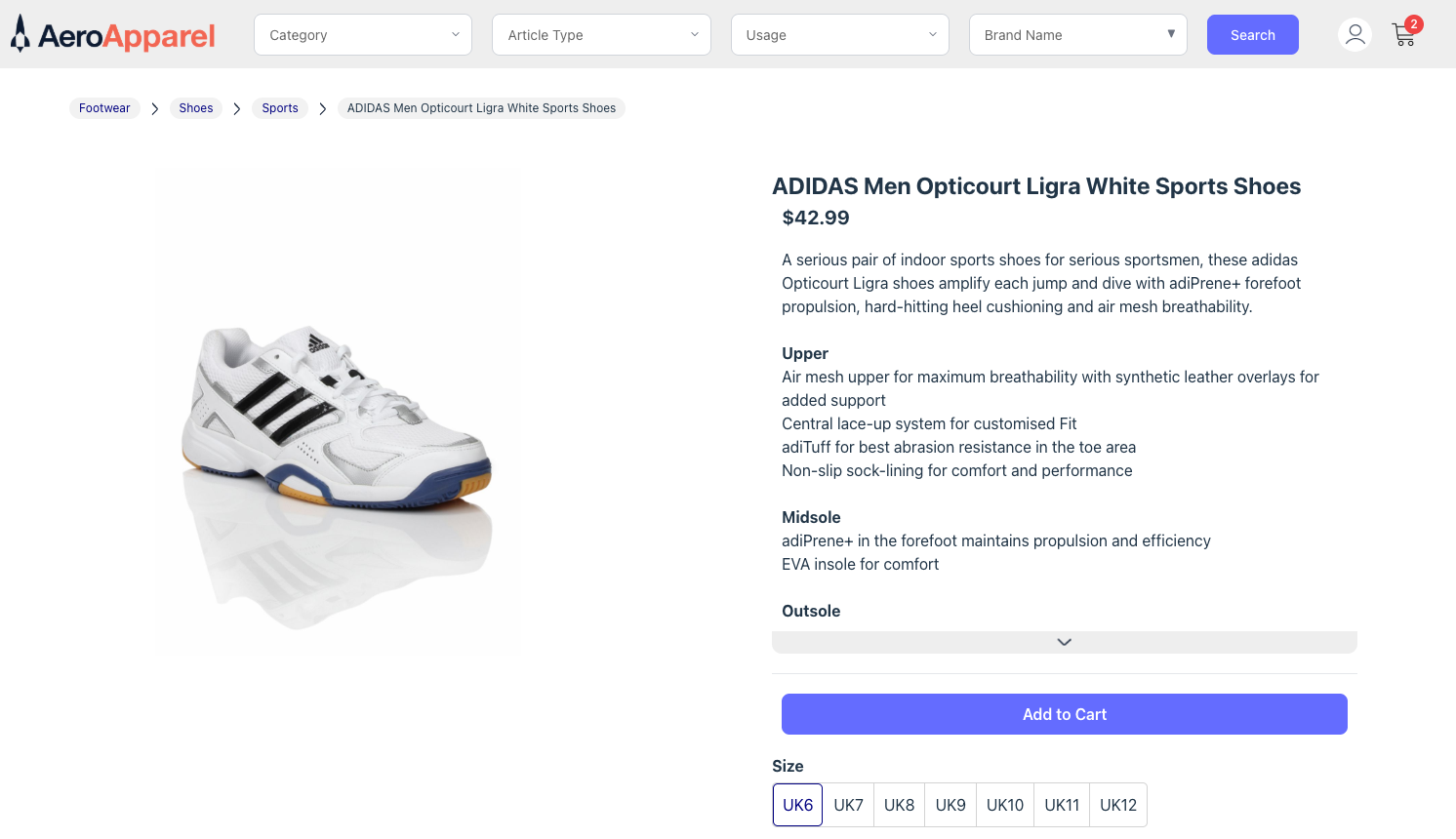
Select any product to load its detail page. The page renders the product’s full information.

Outcomes
You now have:
- A single-condition
querymethod that uses any of the five secondary indexes. - A multi-condition
advanced_searchmethod that combines up to four predicates withand. - A working pattern for testing AEL expressions in Voyager before putting them in code.
You cannot yet:
- Add items to the shopping cart. The cart is empty because
add_to_cartis not yet implemented.
In the next step you implement the cart methods, including a check-and-set update on a nested map document.